Thursday
Aug152013
Interlude - Minecraft Acid Interstate [Far Lands + Acid Shaders]
 Thursday, August 15, 2013 at 9:52AM
 Even if you don't enjoy Minecraft, this is something nice to watch.
Thursday, August 15, 2013 at 9:52AM Even if you don't enjoy Minecraft, this is something nice to watch.
Tuesday, August 13, 2013 at 10:09PM A previous post covered double-lined shapes in older versions of Visio, in this one I'll show you that the process got much simpler in Visio 2013.
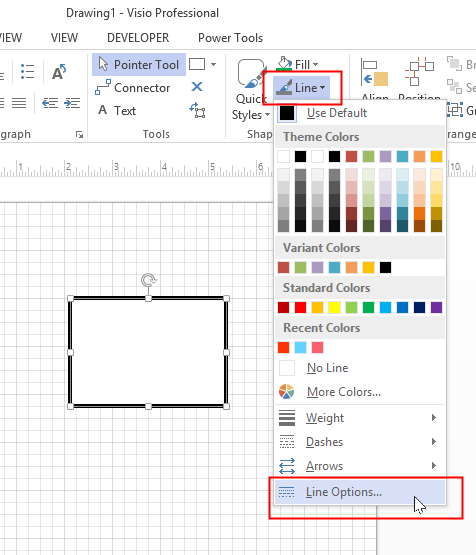
Let's start with a simple rectangle with a 6pt black line as shown below.

While the shape is selected, expand the Line dropdown menu the Home tab of the Ribbon, you won't see anything immediately that helps, but go ahead and click Line Options.
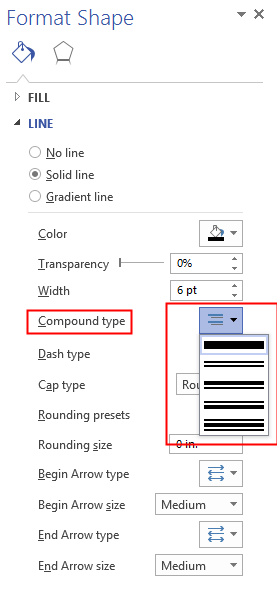
This will bring up the Format Shape panel with the Line section expanded.

Navigate down to the Compound type and select one of options. If you hover over the second style, you'll see it is called “Double”. So select that one.
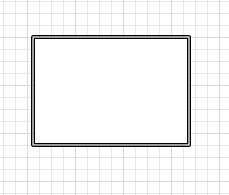
Now your shape has a double-line border.
Now unfortunately, the line border is only 6pts and it can be hard to see both lines. To really prove that the there are two lines, increase the line weight to something like 60pts.
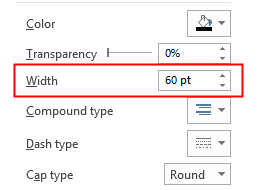
Now we can see it very clearly.
Now, if you select the shape so that the selection handles are visible, you'll see exactly how the line is drawn.
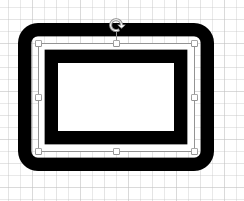
As you can see the one of the lines goes inwards toward the center of the shape and then one is drawn outside the selection rectangle.
So, that's it. Visio 2013 makes it very easy to get shapes with double-lines edges.