Fix My Pen Makes your Wacom Tablet JUST WORK on Windows 7
 Saturday, August 13, 2011 at 9:50AM
 If you are using an older Wacom tablet with Windows 7 the Fix My Pen tool will help you get rid of these annoying things in Windows 7:
- Dynamic Feedback “Rings” when clicking
- Pen Flicks
- Tablet PC input panel
- Press-and-hold delay when clicking
NOTE: If you are using Windows 8 or 10, or have a newer Wacom see this post: The Windows and Wacom Tablet Nightmare is Over
Instructions
Download Fix My Pen from here: https://github.com/saveenr/Fix_My_Pen/releases
Right-click on the ViziblrFixMyPen.exe file and select Run as administrator.
When Fix My Pen starts, you will see all the settings are marked “bad”.
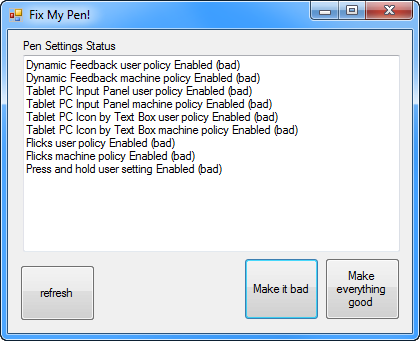
Click Make everything good. Then the program will look like this.
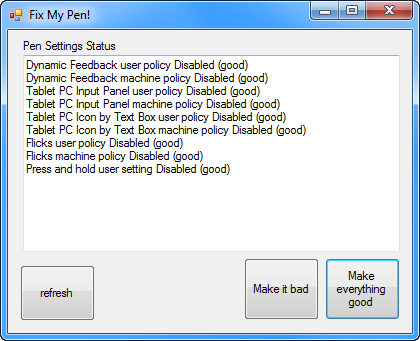
Close the program.
Log-out and log back in to Windows .
Now you can use your Wacom pen without all the Tablet PC nonsense.
I have tested it on Windows 7 Enterprise, Ultimate, and Home Premium.
To Verify that it Works
The Flicks icon will no longer be visible in the Notification Area

The Flicks tab in the Pen and Touch control panel will look like this
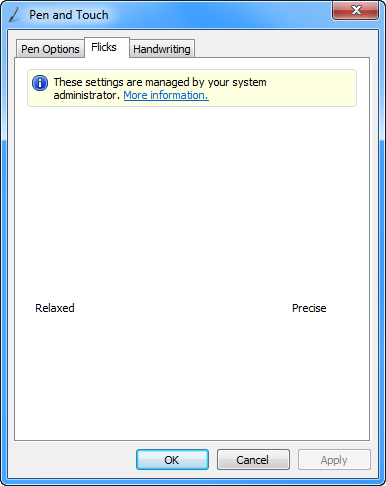
The Tablet PC Input panel will no longer be visible on the Desktop
The Tablet PC icon will no longer show up next to text input boxes
The Tablet PC Input panel options in Control Panel will have several items disabled and grayed-out:
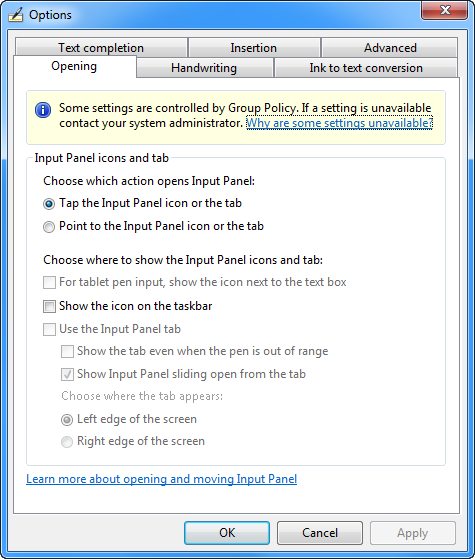
The Press and Hold value in the control panel will be disabled.

Dynamic Feedback rings will be disabled and you will no longer see them when clicking.
Technical Notes
On Windows 7 and Windows Vista you have to follow an arcane set of instructions like this. Fix My Pen, automates those steps – by setting the appropriate Windows registry keys.
License Terms
This is an open source tool distributed under the standard MIT License. You can see the full text of the license here: https://github.com/saveenr/Fix_My_Pen/blob/master/README.md
Source Code
It’s all up here: https://github.com/saveenr/Fix_My_Pen/
Reader Comments (56)
You are just the best. Thank you. I was trying everything I could google and it wasn't working.
Those damn circles appeared for the first time after I have updated my tablet driver! So Thank you so very much!
Fantastic - I don't know how many different solutions I've tried but yours worked FIRST time.
THANK YOU SO MUCH xxxxxxx
Sir, you made my day. Thank you so much for this awesome tool.
i could kiss you!!
thank you so much, this works perfectly!
i had turned all my settings off earlier and it worked for like... one night, and then it all just turned back on again by itself (but according to the settings was still off)
your program fixed it for me <3 thank you thank you thank you!
THANK YOU SO MUCH. I've had some of this crap disabled for years on my Windows 7, but Visual Studio 2012 would completely ignore that and add the delay and ring etc. - but this tool completely destroyed it. THANK YOU.
THANK YOU SOO MUCH!
That solution above worked perfectly. Thank you for sharing :)
Thank you SO very much for posting this. You saved me from going stark raving crazy. Thank you, thank you, thank you.
nice tool but unfortunately it fails on my BOXX 4920 Windows 7 machine with HKEY_CURRENT_USER\Software\Policies\Microsoft|TabletPC is denied, and stops dead at that point, wacom driver installed was 634-3
---
Update on 2013-01-30: I contacted kwiley offline. The problem he was experiencing was that he didn't launch the tool via "Run as Administrator". Once he did that, the tool worked. -saveen
I freakin' love you!!!!!!!!!!!!!! Gonna stay up all night drawing now) XD
You are a master of UX, and a noble coder. I applaud your "Make everything good" button, forever.
THANK YOU SO MUCH! I'm using the wireless Intous5 touch. I've been having this problem since the last driver update. This solution fixed it permanently. Thanks again for taking the time to help with this frustrating issue.
so so so so so so so so awesome
My re-install nightmare is over. Thanks a million!
I could kiss you
Joder. Eres mi héroe tío.
Thanks a lot!
Oh my goodness! This little fix is the BEST ever!! Thank you so much for this! Thank you! Thank you! I cannot say it enough!
Thank you! I can't believe I didn't discover your tool until now - used to dig into registry editing for this.
Worked flawlessly @.@
Other interesting websites