Fix My Pen Makes your Wacom Tablet JUST WORK on Windows 7
 Saturday, August 13, 2011 at 9:50AM
 If you are using an older Wacom tablet with Windows 7 the Fix My Pen tool will help you get rid of these annoying things in Windows 7:
- Dynamic Feedback “Rings” when clicking
- Pen Flicks
- Tablet PC input panel
- Press-and-hold delay when clicking
NOTE: If you are using Windows 8 or 10, or have a newer Wacom see this post: The Windows and Wacom Tablet Nightmare is Over
Instructions
Download Fix My Pen from here: https://github.com/saveenr/Fix_My_Pen/releases
Right-click on the ViziblrFixMyPen.exe file and select Run as administrator.
When Fix My Pen starts, you will see all the settings are marked “bad”.
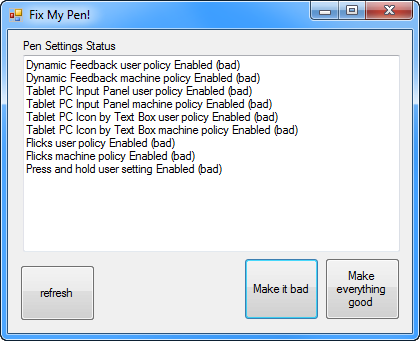
Click Make everything good. Then the program will look like this.
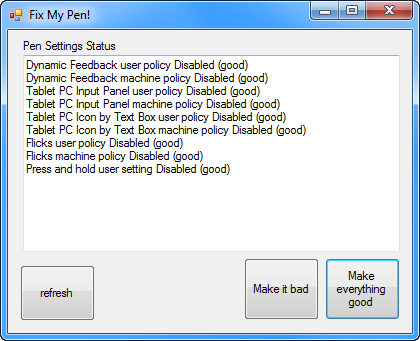
Close the program.
Log-out and log back in to Windows .
Now you can use your Wacom pen without all the Tablet PC nonsense.
I have tested it on Windows 7 Enterprise, Ultimate, and Home Premium.
To Verify that it Works
The Flicks icon will no longer be visible in the Notification Area

The Flicks tab in the Pen and Touch control panel will look like this
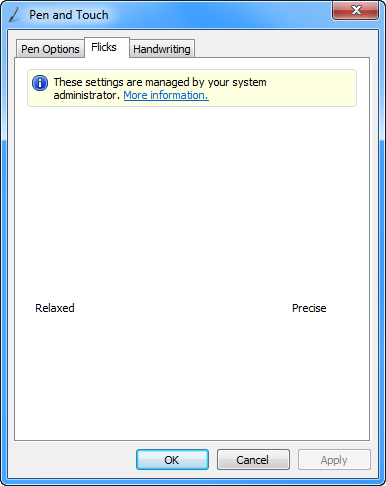
The Tablet PC Input panel will no longer be visible on the Desktop
The Tablet PC icon will no longer show up next to text input boxes
The Tablet PC Input panel options in Control Panel will have several items disabled and grayed-out:
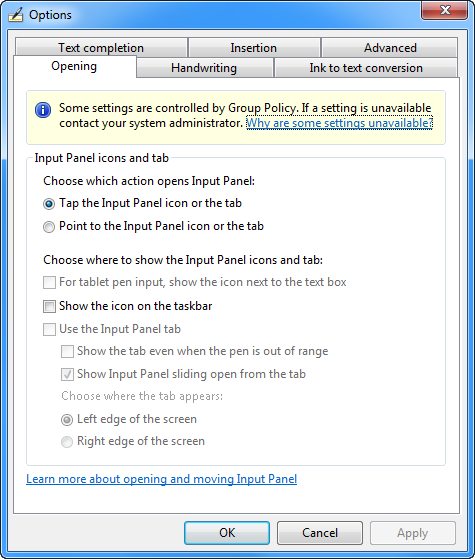
The Press and Hold value in the control panel will be disabled.

Dynamic Feedback rings will be disabled and you will no longer see them when clicking.
Technical Notes
On Windows 7 and Windows Vista you have to follow an arcane set of instructions like this. Fix My Pen, automates those steps – by setting the appropriate Windows registry keys.
License Terms
This is an open source tool distributed under the standard MIT License. You can see the full text of the license here: https://github.com/saveenr/Fix_My_Pen/blob/master/README.md
Source Code
It’s all up here: https://github.com/saveenr/Fix_My_Pen/
Reader Comments (56)
You are a freaking genius and you deserve a thousand medals. You saved my days and nights. Thank you so much !
Really useful - seems to have worked perfectly.
Thanks!
thankyouthankyouthankyouthankyouthankyouthankyouthankyouthankyouthanyoutha thankyouthankyouthankyouthankyou
When I use this, my laptops touch screen stops working. Even after I click "everything bad" and relogin.
Any suggestions as to how to get touch on my laptop screen to work again while keeping the visual changes?
Thanks!
Thanks for the fixit, but my Wacom Graphire buttons are switched, the button on the barrel has to be pressed to draw and the tip appears to be a double click or nothing.
I use the 6.15a driver from Wacom, the control panel app does nothing. I can't do a thing with Corel Painter lite, only in Paint.net.
The FixIt worked great, but now my touch screen on my laptop doesnt respond, even after undoing the changes. ?
Fantastic tool. Thanks soooo(I had much more o in mind but I'm sure you get the thing) much. You should get a Nobel Prize.
Sounds like a wonderful dream, definitely trying this, thanks!
(still beyond me how stupid Microsoft thinks to force tablet functionality on desktop pc's...sigh)
I am using the CTE-450 and i installed the latest wacom driver on my win7 ult machine. the pen seems to only work on the eraser side and the pen nib side is not being recognized by the tablet at all. I have ran the patch you have and have logged out/in. It still has the same problems. any suggestion? I really am grateful for your blog here... it's nice to see someone that actually cares and responds....
tnx, G
Hi, i manually fixed my settings with your helping video some time ago. Now this tool is great if i have to re-install my computer :)) Thank you!
One more question:
I use a wacom bamboo and from time to time my windows forgets which settings i have. I have an export of these so i just re-import them-but this is grrr.
Any ideas?
Thank you so much, my little brother was close to crying about his tablet not working and we didn't have the money to help him buy a new one for school. He was so happy this worked, it really helped us out.
hey saveern,
i have followed all the steps and downloaded the program exactly like you said.
after i did everything you said to do, it still didn't worked. im using the ft-0405-u
have you anything i can do?
MAN! YOU ARE A FUCKING GENIUS! A FUCKING HERO! YOU HAVE NO FUCKING IDEA HOW FUCKING GRATEFUL I AM! FUCK THIS WACOM DRIVER SHIT! fuck fuckedy fuck fuck fuck
Sorry for the style, but after loong hours of fear and pain, I just had to say this. WTF is happened with wacom these days?
So, thank you so much, you saved my lame ass with this awesome program.
Oh thanks God, you are the best. I hate the touch features of the tablet.
Hi man. I hope you can help me out, I've gone and bought myself a Wacom Intouspro, which im trying to run on my Windows 7 Home Premium - Service pack 1. As far as I can see, it should work, but I keep running into : ERROR - Supported tablet not found on the system, whenever i try to open Wacom Tablet Properties & the damn thing won't respond to anything. I've Restarted a bunch, Updated all Wacom relatet, Uninstalled & started from scratch, Rebooted in Services,Tried your program,. But I'm still none the wiser. Got any good advice?
@Mr T
I've never encountered such a severe problem with the tablet. It sounds like your problem is much more fundamental. If you can try this out on a different Windows 7 machine maybe it can reveal whether the problem is with your machine or which the specific tablet you have.
Other interesting websites